
Key Concepts
What's a Room?
A Room is a self-contained workspace where users can explore datasets, run queries, and view results. The term comes from collaborative tools—where users work in shared spaces—and SQLRooms is built with future real-time collaboration in mind.
A Room consists of:
<RoomShell>: a React component that renders the Room UIroomStore: a Zustand-based state store for the Room
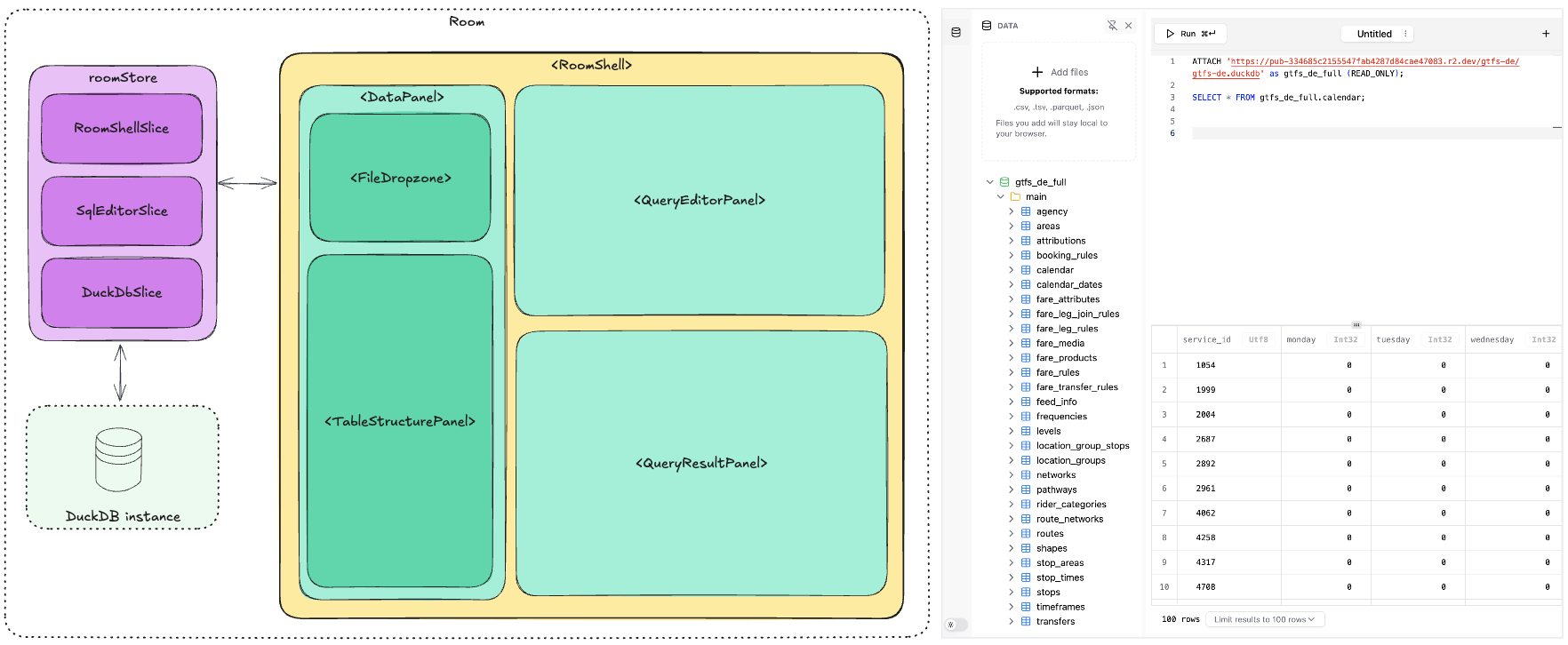
Room Store
The roomStore is a composable Zustand store created by calling createRoomStore(). The store holds:
config: the persistable part of the state that captures a Room's saveable settings and can be serialized to JSON for storage or sharing including:- the view configuration and the layout state
- the user preferences
room: non-persistable state that holds runtime information like:- loaded DuckDB tables
- transient UI state (like "query running")
const {roomStore, useRoomStore} = createRoomStore<RoomState>(
  (set, get, store) => ({
    ...createRoomShellSlice({
      config: {
        dataSources: [
          {
            type: 'url',
            url: 'https://.../earthquakes.parquet',
            tableName: 'earthquakes',
          },
        ],
      },
      layout: {
        config: {
          // Layout configuration
        },
        panels: {
          // Panel definitions
        },
      },
    })(set, get, store),
  }),
);
Check the minimal example for the complete implementation.
RoomShell
<RoomShell> is a React component that wraps your Room UI
- It injects the
roomStoreinto React context, accessible via theuseRoomStore()hook - It sets up essential UI infrastructure including error boundaries, toast notifications, and tooltips, making it easy to use components from
@sqlrooms/uiout of the box - It provides slots for the optional
LayoutComposer(see Layout section below),Sidebar, andLoadingProgresscomponents
const App = () => (
  <RoomShell roomStore={roomStore}>
    <MyComponent />
  </RoomShell>
);
SQL and DuckDB Access
SQLRooms includes a built-in DuckDB integration via the DuckDbSlice. The DuckDbSlice provides helper functions for managing and querying tables:
findTableByName()- Look up a table by name in the current schemaaddTable()- Add a new table from Arrow data or recordsdropTable()- Remove a table from the databaserefreshTableSchemas()- Update the cached table schemastables- The cached list of tables from the last refreshTableSchemas() callgetConnector()- Access the underlying DuckDB connector
You can query your datasets using the useSql(query) hook and work directly with Arrow tables in React.
function MyComponent() {
  const isTableReady = useRoomStore((state) =>
    Boolean(state.db.findTableByName('earthquakes')),
  );
  const queryResult = useSql<{maxMagnitude: number}>({
    query: `SELECT max(Magnitude) AS maxMagnitude FROM earthquakes`,
    enabled: isTableReady,
  });
  const row = queryResult.data?.toArray()[0];
  return row ? `Max earthquake magnitude: ${row.maxMagnitude}` : <Spinner />;
}
For more details on DuckDB integration and available methods, see the DuckDB API Reference.
Composing Store from Slices
The store can be enhanced with slices—modular pieces of state and logic that can be added to your Room. You can use slices from the @sqlrooms/* packages or create your own custom slices. Each slice is a function that returns a partial state object along with methods to modify that state.
Here's an example showing how to combine the default room shell with SQL editor functionality:
const {roomStore, useRoomStore} = createRoomStore<RoomState>(
  (set, get, store) => ({
    // Default slice
    ...createRoomShellSlice({
      config: {
        // Room configuration
      },
      layout: {
        config: {
          // Layout configuration
        },
        panels: {
          // Panel definitions
        },
      },
    })(set, get, store),

    // Mix in sql editor slice
    ...createSqlEditorSlice()(set, get, store),
  }),
);
You can access slices' namespaced config, state and functions in the store using selectors, for example:
const queries = useRoomStore((state) => state.sqlEditor.config.queries);
const runQuery = useRoomStore((state) => state.sqlEditor.parseAndRunQuery);
Learn more about store and slices in State Management.
Layout (Optional)
The LayoutComposer provides a flexible panel layout for your Room's UI.
- Panels are React components that can be plugged into the layout. They include metadata (
id,title,icon) and acomponentto render. - Panels can be moved, resized, or hidden
- Developers can add panels by registering them in the
roomStore. - Layout state is persisted in the
roomStore
Configure the room layout and panels during store initialization:
const {roomStore, useRoomStore} = createRoomStore<RoomState>(
  (set, get, store) => ({
    ...createRoomShellSlice({
      config: {
        dataSources: [],
      },
      layout: {
        config: {
          type: 'split',
          direction: 'row',
          children: [
            {type: 'panel', id: 'data', defaultSize: '30%'},
            {type: 'panel', id: 'main', defaultSize: '70%'},
          ],
        },
        panels: {
          data: {
            title: 'Data Sources',
            icon: DatabaseIcon,
            component: DataSourcesPanel,
          },
          main: {
            title: 'Main view',
            icon: () => null,
            component: MainView,
          },
        },
      },
    })(set, get, store),
  }),
);
Layout composer renders the layout with panels:
function App() {
  return (
    <RoomShell className="h-screen" roomStore={roomStore}>
      <RoomShell.Sidebar />
      <RoomShell.LayoutComposer />
    </RoomShell>
  );
}
For examples of panels, tabs, grids, and docking, see the Layout guide. For the full API, see the Layout API Reference.